


Aydınlatma metni yükleniyor…
Prospective students visiting a university website often do not know which faculty or degree they want to apply to. They may know which school subjects they enjoy, the problems they want to solve or the career they imagine pursuing, but not which undergraduate programme best matches those interests. An alphabetical programme list may be complete, yet it does little to resolve that uncertainty.
An effective university website should therefore operate as more than a digital prospectus. It should help students understand their preferences, narrow their options, compare similar programmes and see where each choice could lead. Achieving this requires information architecture, programme content, search, filtering, mobile usability and content governance to be planned as one connected experience.
The 2025 E-Expectations Trend Report from Ruffalo Noel Levitz reinforces the website’s role in university research. Of the students surveyed, 91% used university websites and 61% preferred personalised content. User-controlled filtering was also preferred to automatic personalisation. These findings support a transparent discovery experience in which students can understand and control how their options are narrowed.
Why is a programme list not enough?
Universities commonly organise information around their administrative structure: faculties, schools, institutes and departments. That hierarchy is accurate from the institution’s perspective, but it does not always reflect how a prospective student thinks. Rather than asking, “Which programmes belong to the Faculty of Engineering?”, a student may ask, “I enjoy mathematics and want to work with data—what could I study?”
A list made up only of programme names creates further problems. Differences between similarly named degrees remain unclear, interdisciplinary options are easily overlooked and students must open every programme page and build their own comparison notes. This burden can cause undecided visitors to leave the website or make decisions without sufficient evidence.
The answer is not to remove the faculty–department hierarchy. It should remain visible, while alternative routes based on interests, strengths, career direction and learning format are added alongside it. The website can then represent the university accurately while supporting visitors who begin their research from different starting points.
How should the degree discovery journey be designed?
A useful journey should not assume that the visitor already knows a programme’s exact name. Students should be able to begin with a broad interest, refine the results using meaningful criteria, create a shortlist and then explore detailed programme pages. At every stage, the interface should show where they are, which filters are active and what they can do next.
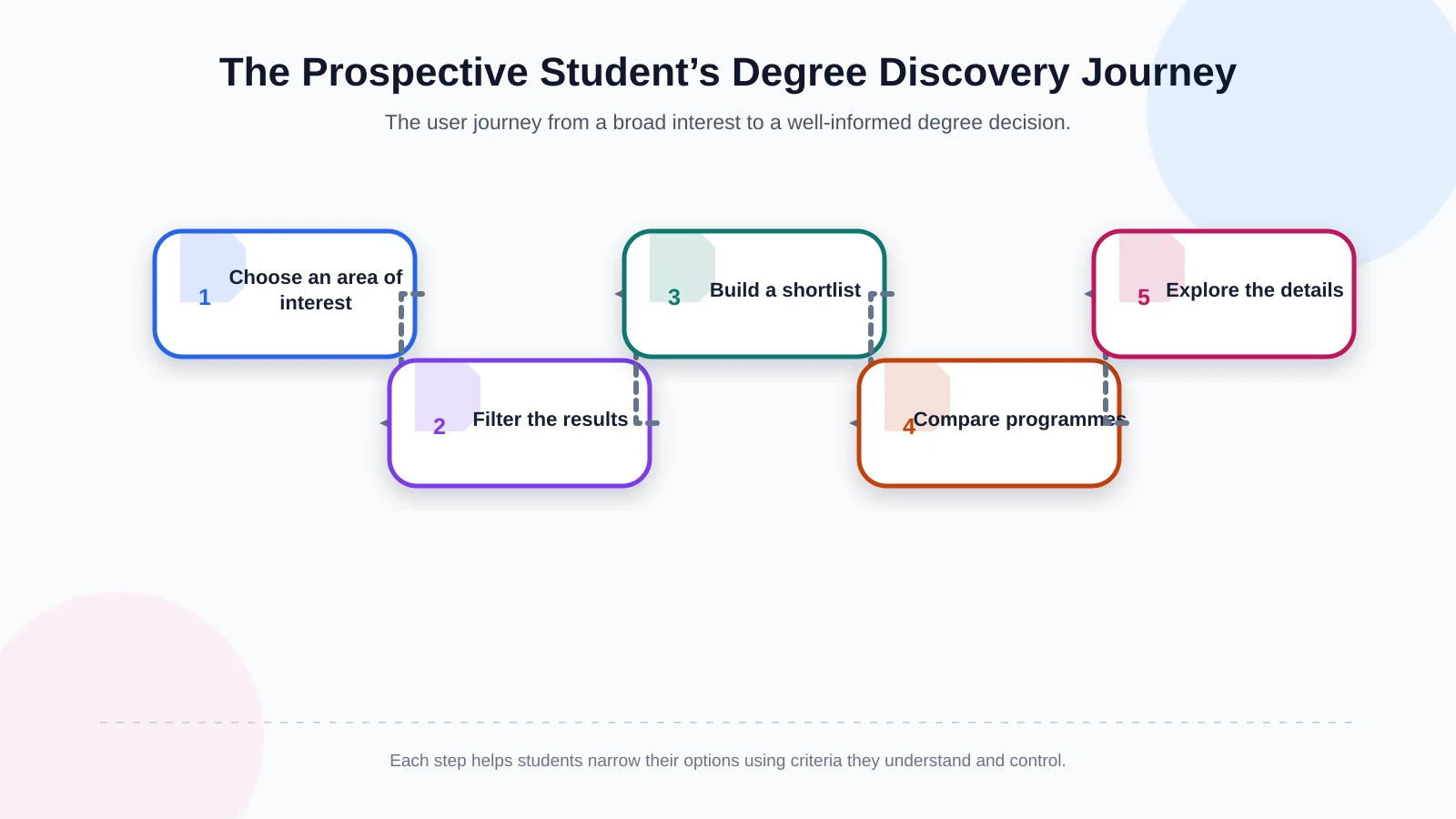
1. Begin with an area of interest
Plain-language clusters such as “people and society”, “design and creativity”, “data and technology” or “health and life sciences” give students a recognisable starting point. These clusters should not replace academic classification; they should act as additional routes into the programme catalogue. A degree may belong to several interest areas where the relationship is genuine.
2. Make filters reflect real decision questions
Filters should extend beyond institutional fields such as faculty and language of instruction. Where reliable data exists, students could refine programmes by quantitative, verbal or creative emphasis; laboratory or studio work; placements; study-abroad opportunities; double-major options; and career area. Labels should avoid internal abbreviations, and each selection should update the results clearly and immediately.
3. Provide shortlisting and comparison
Students should be able to save promising programmes and compare two or three using common criteria. The tool should not declare a winner. Its role is to expose meaningful differences in curriculum structure, teaching language, compulsory placements, practical facilities, exchange opportunities, campus, admissions requirements and possible career paths.
4. Use the programme page to deepen the decision
After comparison, the programme page should provide stronger evidence: its purpose, who it may suit, the capabilities students develop, the curriculum and admissions information. Contextual next steps—attending an open day, asking an adviser a question or reviewing entry requirements—are more useful than a generic contact link alone.
What information belongs on a comparable programme page?
Giving every academic unit a completely different page structure may offer editorial freedom, but it makes comparison harder. A shared programme template presents essential decision information under consistent headings and in a predictable order. Departments can still communicate their distinctive story, faculty and facilities while standardising the fields that students need to evaluate.
A concise description of the programme and the problems or subject areas it addresses
The interests, strengths and working styles likely to suit the programme
The academic and professional capabilities students can develop
An up-to-date curriculum organised by year or semester
Laboratories, workshops, studios and applied-learning opportunities
Placements, exchanges, minors and double-major options
Potential industries, roles and further-study routes after graduation
Current entry requirements, capacity, scholarships and application details
Statistics and historical placement data should not be copied without context. When students need official data for undergraduate programmes in Türkiye, they can be directed to the authorised YÖK Undergraduate Atlas. Any data displayed by the university should identify its period, scope and latest review date.
The curriculum should not exist only as a downloadable PDF. Course names, semesters, compulsory or elective status and, where possible, brief descriptions should be published as structured, mobile-readable HTML. A PDF may remain as an additional format, but essential information should be accessible to search engines and assistive technologies.
| Decision area | Information to present | Value to the student |
|---|---|---|
| Academic structure | Courses and capabilities | Shows what they will learn |
| Learning experience | Placements, laboratories and exchanges | Makes the learning format tangible |
| Career direction | Industries and potential roles | Clarifies future options |
| Admissions | Requirements, capacity and scholarships | Makes the next step clear |
How should search and filtering work together?
On-site search should serve more than users who can type the exact programme name. It should connect intent-led phrases such as “artificial intelligence”, “working with children”, “sustainability” or “game design” with relevant degrees, modules, academic opportunities and admissions content. Synonyms, common misspellings and university-specific terminology should be maintained in a search dictionary.
Results must identify content types clearly instead of mixing programmes, faculties, modules, news and application pages without explanation. A zero-results page should recommend alternative terms, related interest areas and an appropriate advice channel. Search analytics can then reveal unmet questions, unclear terminology and content gaps that require editorial attention.
Search and filters should complement one another. After entering a keyword, students should be able to refine the results by teaching language, campus or career area without losing their selections when they return from a programme page. Shareable result URLs also make it easier to discuss a shortlist with family members, counsellors or teachers.
Why must mobile usability and accessibility be central to the design?
Programme research may begin on a phone, continue on a laptop and finish on a phone again. Mobile support cannot mean merely shrinking a desktop interface. Opening filters, reading comparison data, navigating curricula and reaching application information must be designed for small screens and tested on real devices.
Accessibility is likewise a design and development requirement, not a final checklist. The Web Content Accessibility Guidelines (WCAG) 2.2 provide testable criteria covering keyboard operation, visible focus, headings and labels, target size, contrast and consistent navigation. Filters, menus and comparison controls should work with keyboards and assistive technologies as well as a pointer.
Important decision information should not be hidden behind horizontal scrolling on mobile. Comparisons can transform into stacked cards or allow students to select the fields they want to examine. Touch targets should be comfortably sized, errors should be explained in plain language and forms should request only necessary information. Performance matters too: oversized videos and unmanaged imagery must not delay access to essential content.
How can sustainable content management be established?
The discovery experience remains trustworthy only while its content stays current. When curricula, capacity, academic staff, deadlines or exchange opportunities change, updating the same detail independently across multiple pages introduces errors. The content model should manage repeated data from a defined source and distribute it to relevant pages under controlled rules.
Every content field needs an owner, a validating team, a review frequency and a last-checked date. Academic units might own programme descriptions, student affairs might validate admissions information, communications might maintain editorial consistency and IT might oversee system continuity. The publishing workflow can include drafting, academic validation, language and accessibility review, and final approval.
The CMS should support common programme fields, reusable templates, connected language versions and reminders for time-sensitive content. Connections to student information, admissions, events or CRM systems require explicit rules for data ownership, update direction, permissions and failure behaviour. Where standard modules cannot support these requirements, they can be addressed through custom web development.
Which indicators should measure success?
Page views alone cannot show whether students are making progress. More useful indicators include search-result selection rate, movement from filters to programme pages, programmes added to comparison, zero-result rate, curriculum interactions and progression toward an application step. Before collecting personal data, the measurement plan should define its purpose and account for applicable legal requirements.
Qualitative evidence is equally valuable. Task-based testing might ask prospective students to find three programmes suited to an interest, compare the curricula of two degrees or locate entry requirements. Teams should observe whether participants complete the task, where they hesitate and which labels they misunderstand. Unsuccessful search queries can reveal additional gaps in language or content.
How should a university website redesign project be approached?
A project of this scale should not begin with visual interface concepts alone. Research should involve prospective students, parents, counsellors and internal teams, alongside analysis of existing analytics, search queries and the content inventory. The next stage should define user journeys, information architecture, the programme data model and editorial responsibilities. Wireframes and prototypes can test priority tasks before extensive development begins.
Kumsal Agency combines research-led digital brand consulting, an original web design approach led by an Art Director and a strong custom software foundation. By evaluating the institution’s academic structure, brand character, user needs and existing systems together, the project can bring together custom web design, information architecture, advanced search and filtering, degree comparison or guided-choice tools, mobile development, content planning and necessary integrations.
The final solution should reflect the university’s actual programme structure, content capacity and technical ecosystem. Testing priority journeys with prototypes, validating comparison tools through a pilot group of programmes and trialling the administration interface with content teams reduces launch risk. The result is not simply a polished launch-day website, but a decision-support environment that the institution can maintain for years.
A better degree discovery experience reduces uncertainty
Helping a prospective student choose a degree does not mean giving them one definitive answer. It means creating a trustworthy structure in which they can interpret their interests, evaluate options against common criteria and understand the academic and professional implications of each choice. A clear faculty–department hierarchy, robust search, meaningful filters, consistent programme pages and an accessible mobile experience form the foundation.
To redesign your university’s degree discovery and prospective student experience around genuine user needs, contact Kumsal Agency.