


Aydınlatma metni yükleniyor…
A holding company website is not a digital brochure filled with company logos. Investors, business partners, prospective customers, candidates, journalists and suppliers arrive with different questions. One visitor may want to understand which sectors the group operates in, while another needs to contact a particular subsidiary or review governance and financial information. An effective website explains the corporate structure clearly and provides the shortest practical route to the right company, content or contact point.
That requires decisions about information architecture, company classification, content ownership and routing rules before visual design begins. Otherwise, every new subsidiary makes the navigation more crowded, similar company profiles multiply and teams become unsure whether information belongs on the holding website or a subsidiary’s own site. A scalable structure should represent the organisation today while accommodating future companies, sectors, countries and languages without requiring the entire website to be rebuilt.
Define the role of the holding company website first
The first decision is what role the website will play within the organisation. Will it serve primarily as a corporate hub introducing the group and its subsidiaries, or will it also support investor relations, recruitment, sustainability reporting, news, media resources and supplier applications? The answer affects everything from navigation and integrations to editorial permissions and internal responsibilities.
Document the main audiences and the tasks each one needs to complete. An investor may need an annual report, a customer may need the company responsible for a product, a candidate may look for group-wide vacancies and a journalist may want a media kit. Defining each audience’s entry point, information need and expected next action makes homepage priorities more concrete. It also prevents broad corporate messaging from displacing useful, task-oriented content.
How to Build a Group Company Architecture in Five Steps
The most reliable approach begins with a complete corporate inventory and converts internal structures into categories visitors can understand. Copying an organisational chart directly into the navigation is rarely enough: legal and administrative distinctions that matter internally may provide little guidance to an external user.
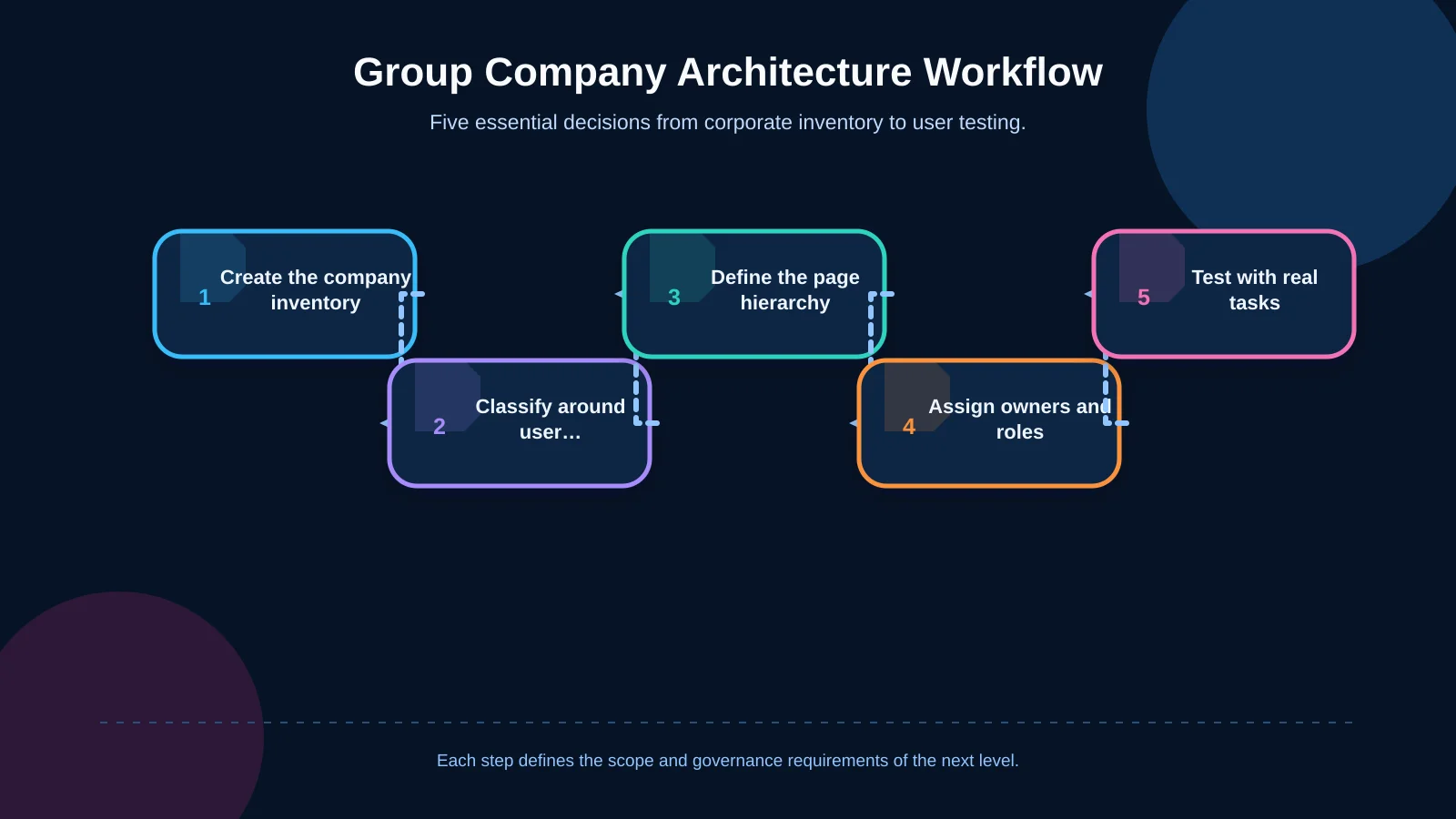
1. Create a company and content inventory
Record every subsidiary, brand, ownership relationship, business activity, operating country, existing website and contact point in one structured inventory. For each company, check whether its logo, summary, imagery, principal capabilities and corporate details exist, are current and have an owner. This exposes missing material and approval dependencies before templates and migration schedules are finalised.
2. Choose a user-centred classification model
Companies may be organised by sector, activity, geography, business line or solution area. The right model begins with the visitor’s question—“Which company provides the solution I need?”—rather than internal department names. For diversified groups, sector-first navigation is often clearest. Where subsidiaries contribute to a connected offering, a value-chain or solution-based model may explain their relationship more effectively.
3. Define page levels and transitions
Create an explicit hierarchy between holding, sector and company pages. A sector page should explain the group’s combined position and capabilities in that field. A company page should clarify the subsidiary’s role, markets, products or services, and contact route. Each level must answer a different question instead of repeating the same corporate history.
4. Assign content owners and data sources
Decide who updates a company name, executive profile, activity description or address when it changes. A central communications team can govern shared standards while subsidiary editors manage only their authorised records. Where numerous roles, approvals or integrations are required, this may call for custom web development designed around the group’s operating model.
5. Test with real tasks
Before launch, ask representative users to complete tasks such as finding the renewable-energy company, locating a contact in a particular country or viewing group-wide career opportunities. Record their routes, misunderstood labels and wrong turns. The evidence may require changes not only to the interface but also to categories, page names and content.
Roles of Holding, Sector and Company Pages
Without clear boundaries, the holding page accumulates every subsidiary detail while company pages repeat the same group story. Each level should support a distinct decision. The holding layer establishes trust and cohesion, the sector layer explains relationships, and the company layer presents specific capabilities and a meaningful action.
| Level | Question answered | Core content | Next step |
|---|---|---|---|
| Holding | Who is the group? | Vision, scale, governance | Explore a business area |
| Sector | What does the group do here? | Approach, capabilities, companies | Choose the relevant company |
| Company | What value does it provide? | Activities, markets, solutions | Visit the website or make contact |
Holding level
The homepage and corporate sections communicate the group’s shared vision, scale, governance approach and main areas of activity. Their purpose is not to reproduce every company profile but to show how the organisation forms a coherent whole. Leadership, history, sustainability, investor relations, press resources and group careers can sit at this level.
Sector or business-line level
When several companies operate in one field, the sector page should explain how their capabilities differ and complement one another. It can combine the group’s sector perspective, key competencies, relevant companies, selected projects and news. Visitors should be able to choose the appropriate company without guessing from logos or unfamiliar legal names.
Company level
Every company page needs a distinctive value proposition, scope of activity, served markets, main product or service groups, selected evidence and a clear next step. If the subsidiary has its own website, visitors can continue there; if enquiries are centralised, the form can preselect the relevant company. A consistent template makes comparison easier while controlled imagery, colour and content areas preserve each company’s identity.
A Navigation Model That Makes Companies Easier to Discover
Listing dozens of company names at the same menu level may demonstrate scale, but it creates a difficult choice for visitors. Use clear primary entries such as “Business Areas” or “Group Companies,” followed by sectors and then the relevant companies. Keeping repeated navigation components in the same relative order across pages also makes the experience more predictable, in line with the W3C guidance on consistent navigation.
For larger portfolios, the directory may include filters for sector, country or solution. Filters should enhance a sound architecture, not conceal ambiguous categories. On-site search may also be necessary when visitors know a product or capability but not the company name. Searchable fields, synonyms, filters and no-results behaviour should be defined as part of the content model.
A large desktop mega menu should not simply be compressed onto a phone. Mobile navigation needs progressive disclosure, clear section headings, visible back routes and sufficiently large touch targets. The GOV.UK Design System header guidance provides a useful example of how a header identifies a service and offers access to shared navigation tools.
Balance the Group Identity with Individual Company Brands
A completely neutral holding website can erase the character of its subsidiaries, while a different interface for every company weakens group cohesion. A shared design system with controlled variables offers a practical balance. Typography, grid, navigation, accessibility rules and interaction behaviour can remain consistent; accent colours, photography, selected graphic elements and editorial tone can vary by sector or company.
Advanced homepage animation should explain scale, connections or value flows rather than serve as decoration. Interactive maps, production chains and portfolio relationships are worthwhile when they reveal information that static content cannot communicate as effectively. An Art Director-led corporate web design process can define how the shared system and subsidiary-specific expression work together from the start.
Plan Multilingual Content, SEO and URL Structure Together
For an international holding group, localisation extends beyond menus and interface labels. Company names, legal titles, local contact details, market-specific activities and publication dates may all require language-level governance. Teams should decide which pages exist in each language, what happens when a translation is unavailable and who is responsible for keeping every version current.
URLs should reflect the chosen hierarchy through short, stable and understandable addresses for business areas and companies. When equivalent language or regional versions exist, they must be linked correctly. Google explains that localised versions can be declared through HTML, HTTP headers or sitemaps and that hreflang relationships should be reciprocal in its documentation for localised pages.
Each company page should have a unique title, description and substantive main content. Thin profiles containing only a logo and a few generic sentences offer limited value and create near-duplicate pages. Explain the company’s role within the group, its operating scope and its relationship to the relevant sector. If existing URLs will change, prepare and test a redirect map before launch.
Scale Content Management and Integrations with the Organisation
With dozens of companies, content management becomes a corporate data-governance challenge. Company profiles should use structured fields for names, sectors, countries, summaries, contacts, images and links. A single approved record can then populate sector pages, search results, directories and maps without being manually duplicated.
Roles may include central administrators, subsidiary editors, translators and approvers. Changes to sensitive fields can pass through approval before publication, with a retained activity history. If the site connects to HR systems, investor data, a press archive, CRM or a brand asset repository, document the authoritative source, update frequency, failure behaviour and responsible team for every integration.
What Should Be Checked Before Launch?
- Associate every company with at least one business area and review questionable classifications.
- Verify logos, company names, legal titles, contact details and external links against current approved sources.
- Test the steps required to reach target companies from the homepage on desktop and mobile.
- Check keyboard navigation, focus order, contrast, alternative text, menu behaviour and reduced-motion preferences.
- Validate language versions, canonical and hreflang annotations, indexability, sitemaps and redirects.
- Confirm that forms reach the correct company or team, success states work and no unnecessary personal data is collected.
- Record content ownership, publishing permissions, backups, security updates and post-launch support responsibilities.
Measure Success Beyond Visitor Numbers
A holding website succeeds when people reach the right company and information, not simply when traffic rises. Useful events include transitions from portfolio cards to company pages, referrals to subsidiary websites, sector-filter usage, internal searches, no-result queries, completed forms and career-platform referrals. Define these events clearly in the measurement plan and avoid collecting personal data that the analysis does not require.
Search records and user feedback can reveal new classification needs. If visitors repeatedly search by product group rather than company name, content and navigation should adopt that language. Adding a subsidiary should trigger more than a new profile: teams must update sector relationships, language versions, search synonyms, contact routing and measurement rules.
Conclusion: The Corporate Structure Should Make Navigation Easier
A well-planned holding company website does more than place group companies side by side. It explains their relationships, shared value and distinct roles while helping each audience move confidently toward the right destination. User tasks, classification, page hierarchy, brand systems, localisation, editorial roles, integrations and measurement must therefore be designed as one connected framework.
Kumsal Agency approaches corporate websites through business goals, real user needs, information architecture, content operations, responsive design, performance, security and sustainable management. To plan a scalable group company architecture around your holding structure, audiences and governance needs, contact Kumsal Agency.