


Aydınlatma metni yükleniyor…
The project portfolio is often one of the most visited parts of an architecture firm’s website. Yet an effective portfolio is more than a gallery filled with attractive photographs. It is a strategic narrative system that helps prospective clients, developers and project partners understand the firm’s areas of expertise, preferred project scale and approach to design.
Different visitors arrive with different questions. One may want evidence of a completed building at a comparable scale; another may be assessing the firm’s experience in a particular location or sector. Others need to understand whether the team handled concept design, delivery, site coordination or the entire process. A well-structured portfolio answers these questions quickly, combining a confident visual language with clear project information and relevant routes to enquiry.
Define the portfolio’s purpose and audience first
Portfolio planning should begin with business goals, not a page template. If the practice wants to grow in residential, hospitality, workplace or mixed-use projects, its selection and ordering should support that ambition. A design-led studio entering international competitions will not need exactly the same narrative structure as a firm known for technical delivery and site coordination.
Start by identifying whom the portfolio must persuade. A property developer may look for delivery capacity, relevant scale and repeatable expertise. A private client may prioritise trust, design approach and a transparent process. Journalists need accurate credits and publication-ready assets, while potential employees may look for clues about the studio’s culture and working methods. Separating primary and secondary audiences clarifies which evidence deserves prominence.
For each audience, define the action the website should encourage. This might be requesting a proposal, arranging an introductory meeting, exploring comparable projects or accessing press material. The portfolio then becomes more than an archive: it creates a deliberate journey from evidence to a productive next step.
How should project selection and portfolio hierarchy be structured?
Publishing every completed commission can dilute the firm’s positioning. Instead, select projects that support the type of work the practice wants to win today. Evaluate each candidate by design quality, relevance, recency, scale, the firm’s role and the availability of strong, publishable content.
RIBA’s portfolio preparation guide recommends prioritising relevant experience and providing essential information such as location, client, budget, project stage and personal role. Applied to a practice website, this principle helps visitors assess not only the finished design but also the scope and depth of the team’s experience.
A useful hierarchy has three levels. The homepage presents five or six strategically selected projects that communicate the firm’s current positioning. The portfolio index supports broader discovery across all publishable work. Individual project pages then explain the context, challenge, approach and outcome. Each level has a distinct role and should not simply repeat the same grid.
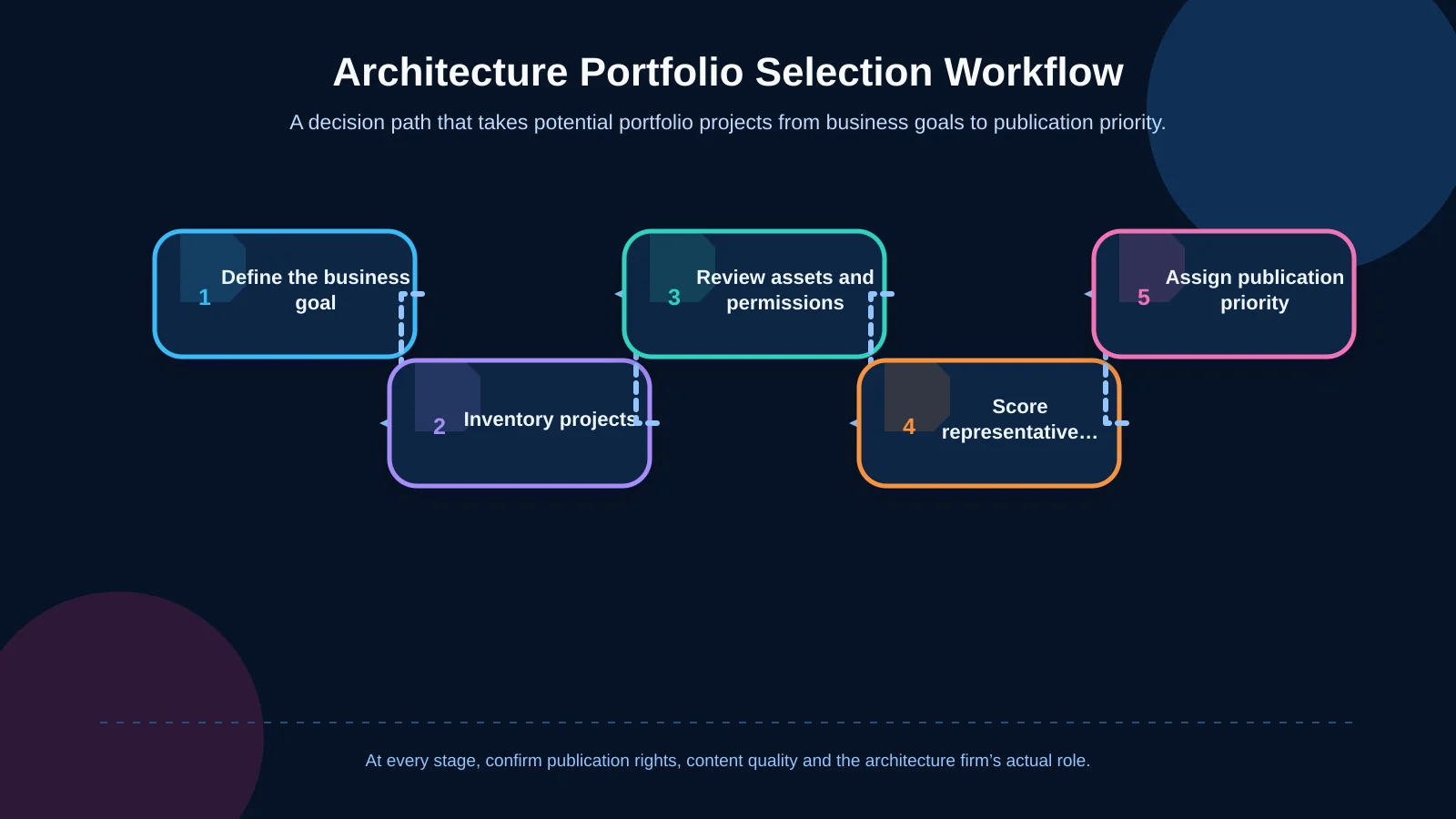
Build the selection in a clear decision sequence
Begin with an inventory of projects and available assets. Identify the work that aligns with target sectors, then check the availability and publication status of photography, plans, sections, diagrams and copy. Where several projects demonstrate the same capability, prioritise the one with the clearest story and strongest evidence. Assign homepage, category and case study priorities, then review whether the final selection represents the practice’s expertise without overemphasising one building type or period.
Categories and filters should follow visitor decision-making
A purely chronological project grid becomes difficult to explore as a portfolio grows. Categories should reflect how prospective clients search, rather than mirroring internal department names. Building type, service scope, project status, scale and location can provide useful classification dimensions.
Labels such as Residential, Hospitality, Workplace, Cultural and Mixed Use offer an accessible starting point. If the firm also provides interior architecture, restoration, implementation or consultancy, service scope can be stored as a separate field. A flexible content model should allow one project to belong to several relevant categories without creating duplicate pages.
More filters do not automatically create a better experience. Display only criteria that produce meaningful groups and materially help a visitor decide. Result counts should update clearly after each selection, while zero-result states should offer an easy way to remove filters or return to a broader category. On mobile, the filter interface must not obscure the portfolio, and active criteria should remain visible.
What should an architecture project page include?
A project page should explain not only what the building looks like, but also why and how it was developed. The opening area can combine the project name, building type, location, year and a strong hero image. A concise summary should immediately establish the main design question and the practice’s response.
The project facts may include client, gross floor area, status, service scope, team, collaborators, photographer and associated disciplines. Publish only verified information instead of showing empty labels. Where confidentiality applies, the client or precise location can be generalised, but that editorial decision should be documented before publication.
The main narrative can follow a simple sequence: context, design problem, approach and outcome. Site conditions, climate, an existing structure or user needs establish the context. The central challenge then frames the decisions that follow. Massing, circulation, materials, daylight or adaptive reuse strategies should be explained with their rationale. Completed projects can use construction and inhabited photography; ongoing work may rely on models, sections and visualisations.
End with two or three genuinely related projects based on building type, scale or service scope. The enquiry prompt should also reflect what the visitor has just viewed. “Discuss a residential project of a similar scale” is more useful than a generic “Contact us” button. This connection turns the portfolio into a qualified business-development tool rather than a visual dead end.
| Layer | Content | Question answered | Quality check |
|---|---|---|---|
| Opening view | Name, type, location and hero image | What is this project? | Representative strength |
| Project facts | Year, area, status, role and team | What did the firm deliver? | Factual accuracy |
| Story | Context, problem, approach and outcome | Why was it designed this way? | Clarity |
| Evidence | Photography, plans, sections and details | How was the approach implemented? | Rights and credits |
| Next step | Related projects and enquiry route | Where do I go from here? | Contextual call to action |
Visual storytelling should communicate information as well as aesthetics
Architectural photography sits at the centre of most portfolios, but exterior hero shots alone rarely explain the design thinking. Combine establishing views, spatial experience, details, human scale, context, plans and sections. Every image should answer a question; frames that repeat the same angle or information can be removed.
Image order can form a compact project story. Begin with a wide view that establishes context, explain the main design decision through a plan or diagram, move through spatial and material details, and finish with the building in use. Photographer, visualisation studio and other rights-holder credits should be presented consistently, with usage permissions confirmed before publication.
For accessibility, alternative text should briefly explain the purpose of an informative image in its page context. The W3C’s alt text decision tree recommends meaningful descriptions for informative images and an empty alt attribute for images that are purely decorative. “Brick residential blocks arranged around a shared courtyard” is more helpful than “project image.” Plans and diagrams may require a concise summary in surrounding copy when their meaning cannot be captured adequately in a short alt description.
Plan mobile experience, performance and SEO together
Uncontrolled use of high-resolution architectural imagery can make portfolio pages slow and frustrating. Generate appropriate image sizes for different viewport widths, consider modern formats and defer assets that are outside the initial view. Avoid aggressive loading techniques that delay the main project image. Cropping and focal points should be tested separately on desktop and mobile, particularly where an image contains people, structural details or important site context.
Google’s image SEO guidance recommends standard HTML image elements, descriptive file names, contextually appropriate alt text and responsive images. Project names, locations and building types should also appear as crawlable HTML text rather than being embedded only inside images. This allows visitors and search engines to interpret the page more reliably.
Give every project a stable, unique URL, page title and concise meta description. A pattern such as “Project Name | Building Type | Architecture Firm” can work, provided it does not become repetitive keyword stuffing. Descriptive links between portfolio listings and individual projects also help users navigate and search engines understand content relationships.
These requirements extend beyond choosing a visual template. Kumsal Agency’s brand-specific web design service brings information architecture, user experience, creative direction, interaction and responsive design into one coherent system. Where a portfolio requires structured content, advanced filters, multilingual fields or integrations, its web development approach can align the interface with the practice’s operational and editorial needs.
The CMS should support sustainable publishing
A portfolio remains useful only if the team can add and update projects without depending on technical support for routine publishing. The CMS should provide structured fields for the project name, summary, category, location, year, status, services, team, credits and SEO metadata. Editors should be able to reorder images, select cover media and assign related projects without rebuilding the page.
Draft, review and published states reduce content errors. A project architect might enter technical information, the communications team may prepare copy and media, and an authorised editor can give final approval. On multilingual websites, localisation must extend beyond interface labels. Summaries, facts, categories, alt text, calls to action and metadata all require language-specific completion and review.
Pre-publication checks for every project
Verify factual accuracy, spelling, image rights, photographer credits, mobile crops, alt text, links and the enquiry journey before publication. Missing information is common in older projects, so required fields should reflect realistic content conditions. Otherwise, editors may feel forced to invent unavailable data or publish empty, meaningless labels. A concise checklist, named owners and an approval record make quality easier to maintain as the portfolio expands.
How should portfolio performance be measured and improved?
Page views alone do not show whether a portfolio is effective. More useful indicators include which projects lead visitors to another case study, which filters are used, how often users move from project pages to an enquiry form and whether those enquiries are relevant. Phone calls, email clicks and form submissions can be measured as separate actions.
Search terms, sales conversations and enquiry content can expose gaps in the portfolio. If visitors repeatedly ask about a building type that is difficult to find, reconsider the category system or homepage selection. If a heavily viewed project produces no meaningful next step, its facts, narrative, related-project links or call to action may need improvement.
Schedule regular editorial reviews. As new projects are completed, older work that no longer supports the firm’s positioning can be moved out of prominent areas. Low-quality imagery can be replaced, outdated facts corrected and missing credits added. The website then operates as a living publication of current expertise, rather than a frozen record of the practice’s past.
A strong portfolio places the right project in the right context
An effective architecture portfolio combines a deliberate project selection with intuitive categories, consistent project facts, disciplined visual storytelling and clear enquiry routes. When mobile performance, accessibility, SEO, publication rights and editorial management are planned from the outset, the result remains useful to visitors and manageable for the practice.
To plan a mobile-friendly, manageable portfolio website aligned with your architecture firm’s project types, audience, content workflow and brand identity, contact Kumsal Agency.