


Aydınlatma metni yükleniyor…
For a construction or contracting company, a website is more than a digital business card. Clients, investors, architects, business partners and qualified candidates often use it to assess the company’s history, technical capabilities and current work before making direct contact. Effective construction company web design must therefore combine strong visuals with verifiable information, a clear project portfolio and a credible corporate narrative.
A well-planned website brings brand identity, project experience and visitor needs into one coherent structure. It explains where the company specialises, demonstrates relevant experience and guides qualified visitors towards an enquiry, partnership or tender conversation. This guide covers the essential decisions that construction, contracting, engineering and building companies should make when planning a sustainable corporate website.
Which Business Goals Should a Construction Company Website Support?
The first decision is not a colour palette, typeface or animation style. It is the business purpose of the website. A general contractor, residential developer and engineering company specialising in industrial facilities will have different priorities. The website should clearly support the relevant objectives, whether they include prequalification, investor confidence, property marketing, partner acquisition or entry into new markets.
Each audience should be defined alongside its information needs. A prospective client looks for comparable completed work; an investor considers scale and reliability; an architect examines technical capabilities; a supplier needs collaboration information; and a candidate wants to understand the company culture. Instead of placing every detail on the homepage, use it as a focused routing point that directs each visitor to the right content.
- Communicate areas of expertise and operating regions within seconds
- Present completed and ongoing projects using comparable information
- Substantiate corporate history, quality standards and technical capacity
- Separate tender, partnership, career and general enquiries
- Enable the internal team to publish new content consistently
How Do You Build a Credible Information Architecture?
Information architecture determines how quickly visitors can find a useful answer. For most construction and contracting websites, a solid foundation includes Home, About, Services, Projects, Sustainability or Quality, News, Careers and Contact. The navigation should not reproduce the company’s departmental chart; it should reflect the language and priorities of external users.
Service pages answer “What do you do?”, while project pages answer “Where have you done this before, and what was your scope?” An About page should go beyond a timeline to communicate management principles, working practices, capabilities and milestones. Certificates, memberships and awards should appear with their current status and relevant scope. Expired credentials or unexplained logos can weaken rather than strengthen trust.
During planning, document the intended audience, question answered, required content and next action for every page. This exposes content gaps before visual design begins. For an example of turning technical engineering expertise into a tangible project narrative, review Kumsal Agency’s Emisyon Engineering web design project.
How Should a Project Portfolio Be Presented?
The project portfolio is one of the strongest reputation assets on a construction website. A gallery of large photographs alone does not explain the company’s actual contribution. Every project page should use a consistent set of fields, such as project type, location, date or status, client, contractual scope, disciplines delivered and the defining solution. Information restricted by confidentiality or contract terms must remain unpublished, with approval boundaries agreed in advance.
Projects may be filtered by sector, service, location, status or building type, but the number of filters should match the portfolio’s scale. Complex filtering adds friction to an archive of ten projects, while search and filtering become essential when hundreds of records exist. Consistent image ratios and concise facts on each card help decision-makers scan for relevant experience quickly.
What Should a Project Detail Page Include?
A project page can follow a case-study structure: the requirement or context, the company’s responsibility, its delivery approach and the resulting outcome. Use figures only when they can be verified. Standardise units when publishing floor area, capacity, duration or number of storeys, and avoid unsubstantiated claims such as “record-breaking”, “the largest” or “flawless”.
- A concise, original summary identifying the project
- The company’s contractual scope and delivered disciplines
- High-quality photographs and video optimised for performance
- Plans, sections, technical solutions or process visuals where appropriate
- Links to relevant services, comparable projects and an enquiry action
Select photographs professionally, confirm usage rights and, where possible, show both construction and completed states. Alternative text should explain each image’s purpose. The page then becomes more than a visual showcase: it becomes a structured evidence file for people assessing the company’s experience. Kumsal Agency’s Uygar Construction web design project provides another approach to presenting a sector-specific portfolio.
| Content field | Question answered | Reputation value |
|---|---|---|
| Project summary | What was delivered, and where? | Makes the experience easy to understand |
| Contractual scope | What role did the company perform? | Makes capabilities tangible |
| Technical approach | How was the challenge resolved? | Demonstrates specialist expertise |
| Photographs and drawings | Can the delivery be seen? | Builds confidence through visual evidence |
| Verified outcome | What result was achieved? | Connects the claim to evidence |
Which Content Strengthens Corporate Reputation?
Reputation grows through the quality of evidence, not the number of claims. Instead of simply describing the business as “reliable and innovative”, demonstrate how those qualities appear in projects, processes and policies. Current leadership information, team capabilities, completed work, quality policies, occupational health and safety practices, sustainability initiatives and verifiable references should form a connected narrative.
A news or insights section can show that the organisation remains active. Suitable topics include project commencements and handovers, technical articles, trade fair participation and community programmes. Each item should have a clear date and named author or corporate source. If a section has not been updated for years, it should not occupy a prominent position in the main navigation. Agree an editorial calendar and ownership before launch.
For a multilingual website, translating navigation labels is not enough. Project descriptions, forms, validation messages, metadata and legal notices must be fully localised. Machine-generated drafts should receive expert review before publication, with regional terminology, spelling conventions and measurement units checked for the intended market.
Mobile Experience, Performance and Accessibility
Visitors reviewing the website on a construction site, in a meeting or while travelling need fast access to project and contact information. Mobile design should not be treated as a smaller desktop layout. Navigation, portfolio filters, galleries, touch targets and forms require dedicated testing on compact screens. Principles for adapting content without losing functionality and giving users control over motion are explained in the W3C WCAG 2.2 Quick Reference.
Large construction photographs, drone footage and sophisticated animation can create impact, but unrestrained use slows pages down. Prepare images in appropriate dimensions and formats, defer off-screen media where suitable, provide poster images for video and ensure animation does not interrupt user tasks. Google’s explanation of Core Web Vitals describes metrics for monitoring loading performance, responsiveness and visual stability in real user experiences.
- Test navigation, filters, galleries and forms on real phones and tablets
- Resize and compress every image for its actual display context
- Check contrast, keyboard access, focus states and alternative text
- Support reduced-motion preferences and provide controls where necessary
- Monitor performance after launch as new portfolio content is added
Improving Project Visibility with SEO
SEO does not mean repeating target phrases throughout every page. It means creating a structure that search engines can interpret and users can navigate confidently. Google’s SEO Starter Guide emphasises useful, well-organised content, descriptive links and making pages accessible for discovery.
Every service and project page needs a distinct title, description and body copy. Instead of a generic heading such as “Our Projects”, combine the project name with its building type and location when useful. Support images with meaningful filenames and alternative text. Build natural internal paths from services to relevant projects and from project case studies back to specialist capabilities. Before launch, review the XML sitemap, redirects, canonical choices and indexing rules.
Local and international visibility require different content strategies. Avoid producing near-identical pages for every city. Describe regions where the company genuinely operates using relevant services, completed work and original evidence. Monitor search performance regularly and treat results as evidence for improving content and technical quality, never as a guaranteed outcome.
Content Management, Forms and Integrations
A sustainable website allows the company team to manage routine updates without developer support. Standardise fields in the content management system and define draft, review and publishing roles. Controls for image dimensions, required fields, translation status and SEO details help editors maintain quality as the portfolio grows.
A contact form should do more than send every submission to one inbox. Tender requests, supplier applications, careers and general enquiries require different fields and owners. Ask only for necessary personal data, present appropriate privacy and consent information, and ensure spam protection remains accessible. Define data ownership and failure scenarios for CRM, email, maps, analytics and recruitment integrations at the start of the project. Where leads feed into a sales system, field mapping, assignment and follow-up status should be planned as part of the complete enquiry journey.
How Should the Web Design Process Be Managed?
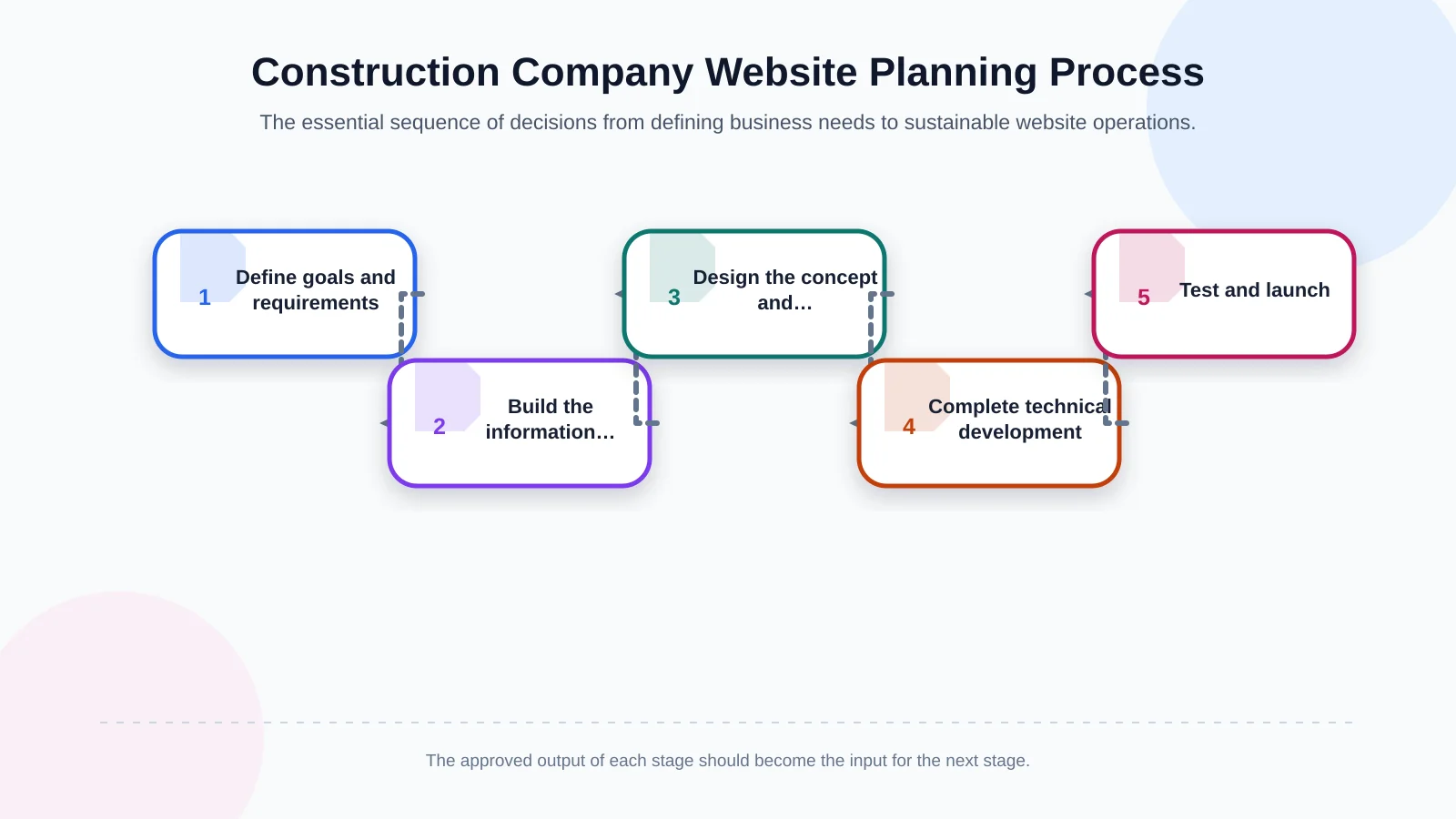
A sound process begins with research and requirements analysis. Review brand positioning, differentiators, target users, existing content, technical requirements and internal approval workflows together. The next step is to establish the sitemap, purpose of each page and content ownership. Moving directly into interface design before completing this groundwork often creates content and scope problems later.
Once the information architecture is approved, develop a brand-specific creative concept and user experience. Use prototypes to test navigation, project filters, gallery behaviour and form journeys. The technical phase then covers responsive development, the management panel, multilingual functionality, integrations and required animation. Launch should follow content entry, quality assurance, performance checks, accessibility review and search-engine validation.
Launch is the beginning of an operating cycle, not the end of the project. Establish a recurring plan for backups, security updates, analytics monitoring, form checks and content ownership. Review project accuracy, broken links and mobile performance at defined intervals.
How Do You Choose the Right Web Design Partner?
Do not assess an agency solely through a proposed homepage visual. Examine how its team defines research, information architecture, content responsibilities, design approvals, technical infrastructure, testing and post-launch support. The proposal should clearly state the number of unique templates, supported languages, project migration, integrations, animation scope and maintenance arrangements.
Kumsal Agency is an Istanbul-based digital agency combining web design, custom web development, digital brand consulting, digital design and production. Its corporate web design approach connects research and requirements analysis with a brand-specific creative concept, information architecture, user experience and responsive development. Advanced interactions, content management, forms, integrations and multilingual structures are planned around actual project needs. The objective is a sustainable experience that looks distinctive, keeps project information manageable and helps visitors reach credible evidence quickly.
Turn Your Project Portfolio into a Digital Reputation Asset
An effective website for a construction or contracting company supports corporate claims with project evidence, routes different audiences towards relevant information and removes uncertainty from the enquiry process. Success depends less on a spectacular homepage than on clear information architecture, consistent project data, a fast mobile experience and disciplined content management.
For a corporate website planned around your construction company’s reputation and project storytelling needs, contact Kumsal Agency.