


Aydınlatma metni yükleniyor…
More copy, photography or video is not always enough to explain a product online. When a product has an intricate internal structure, moving parts, several material options or numerous configurations, buyers may need to examine it more closely before making a purchase or requesting a quote. A WebGL-based 3D product experience can meet this need through a model that visitors can rotate, zoom into and modify directly in the browser.
However, adding 3D does not automatically improve every project. If model production, performance optimisation, mobile support, accessible alternatives, content management and maintenance are overlooked, an impressive-looking experience can become another barrier between the visitor and the product. The essential question is therefore not “Can we use WebGL?” but “Which customer decision will this interaction make easier?”
What is WebGL, and what does it offer for product presentation?
WebGL is a JavaScript-based web technology for rendering two- and three-dimensional graphics in compatible browsers without a plug-in. It can use the graphics-processing capabilities of the visitor’s device. The MDN WebGL documentation explains its technical scope and browser support, but hardware still affects the result. The same experience may not run equally smoothly on a powerful desktop computer and an entry-level phone.
Its value goes beyond displaying an object in three dimensions. Visitors can inspect a product from different angles, open a cover, separate components, choose a colour or finish and immediately see the result. Thoughtful camera positions, lighting and interaction points can make important components easier to understand than lengthy descriptions alone.
A WebGL scene does not need to replace the whole product page. Standard product information, specifications, documents, pricing and enquiry controls can remain in semantic HTML while the 3D viewer performs one clearly defined storytelling task. This architecture gives search engines and assistive technologies access to the essential content and provides a resilient alternative for unsupported devices.
Which projects benefit from a 3D web experience?
WebGL is most valuable when physical characteristics materially influence the decision and two-dimensional media cannot explain them adequately. Manufacturing equipment, furniture, lighting, automotive components, architectural products, electronics, packaging and customisable consumer goods are strong candidates. Even then, the decision should be based on the user’s task and available product data—not the industry label alone.
Technical products with difficult structures or operating principles
Static photographs may struggle to explain the modules of a machine, internal flow through a valve or service points on a device. Exploded views, cutaways, component highlighting and controlled animation help users understand how parts relate to one another. In B2B projects, this can support technical pre-qualification before a sales call, help buyers identify the correct model and produce better-informed quote requests.
Products whose options change appearance or compatibility
A 3D configurator can become a practical decision tool when colour, material, dimensions, accessories or modules change the final product. Showing visual options alone is insufficient: invalid combinations, SKUs, prices, stock, delivery rules and quotation logic must also be addressed. In complex B2B scenarios, the visualisation layer should use the same rules and master product data as the wider configuration and ordering system.
Products where design detail drives the purchase
Proportion, material and surface quality are central to furniture, interiors, fashion accessories and premium packaging. Controlled lighting and close inspection can reveal details that a standard image gallery misses. Credible results nevertheless require high-quality modelling, accurate materials, optimised textures and art direction. A weak model can undermine the quality customers associate with the physical product.
Launches built around discovery and interaction
For a new product family, concept vehicle or technology device, 3D storytelling can turn a passive viewer into an active participant. Scroll-controlled scenes, selectable features and short usage animations can reinforce the launch idea. The objective is not to maximise interaction time; it is to communicate the product’s difference in a memorable, controlled sequence.
How should the WebGL decision process be structured?
The process should not begin with modelling or development. First identify the product question visitors cannot currently answer. Then assess whether 3D responds better than photography, video or a technical drawing. Once that value is established, define the content, technical architecture and measurement plan.
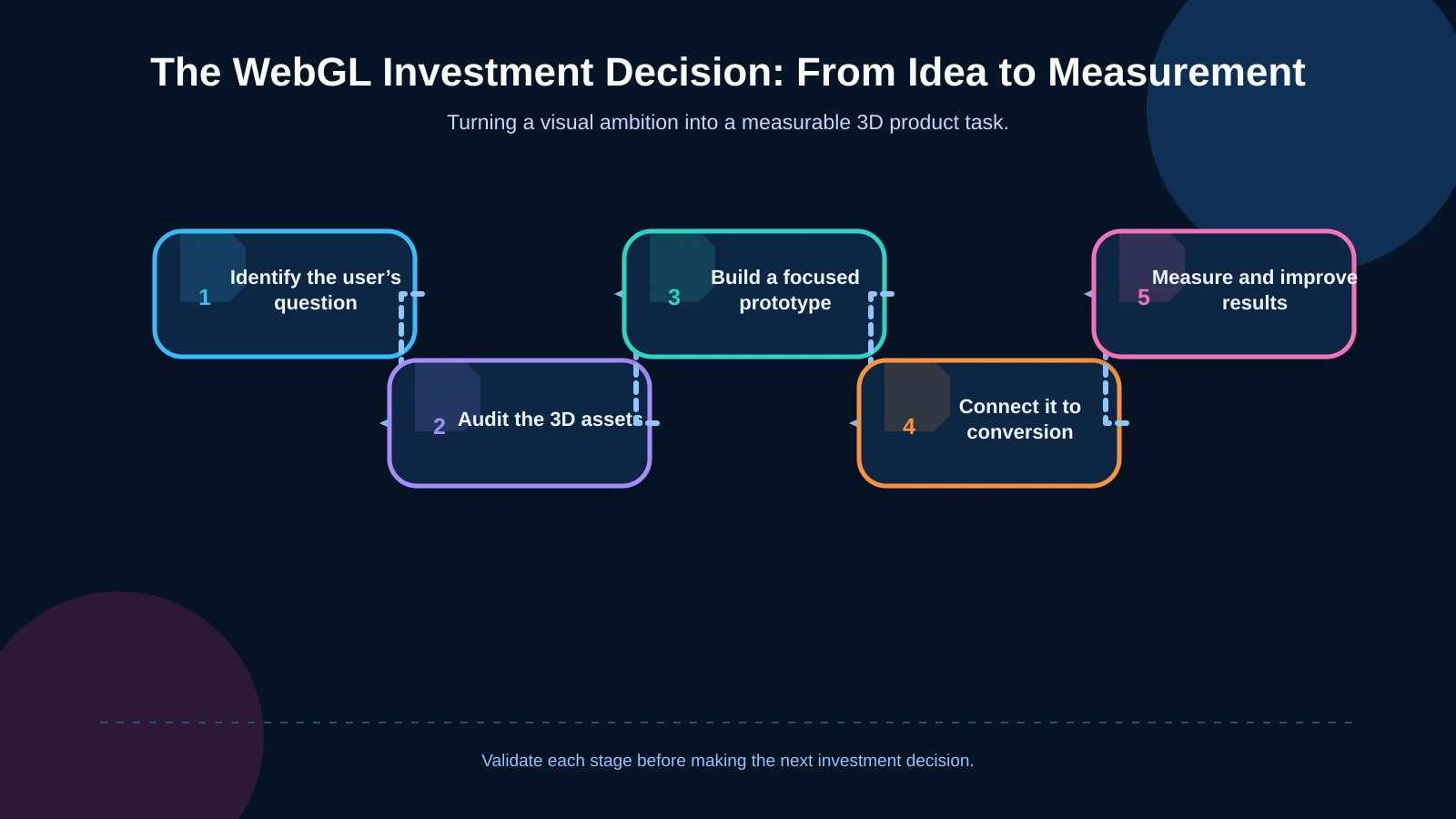
1. Define the user task and business objective
Does the visitor need to understand the product, compare options, confirm compatibility, request a quote or buy? Replace an abstract goal such as “create an impressive website” with a measurable outcome: completed enquiries, correct variant selection, feature discovery or better-qualified leads for the sales team. Every interaction can then support a real task.
2. Audit product data and 3D assets
Having a CAD file does not mean the model is ready for the web. Manufacturing files may contain excessive detail or confidential internal components that must be removed. Polygon counts, textures, materials, animation and variant relationships need to be prepared for browser delivery. If options change frequently, establish the ERP, PIM or administration panel that owns the master data.
3. Prototype the smallest valuable experience
Start with one product and one critical task instead of an entire catalogue. The prototype might let users rotate a product and inspect three components, or switch between two finishes. Test comprehension, device performance, loading time and behaviour. If the interaction does not improve the decision, change direction before expanding production.
4. Connect the experience to conversion and integrations
If a chosen configuration cannot pass into the quote form or basket, the user must enter the same information again. Carry the SKU, options, price, screenshot or configuration ID into the next step. Custom web development can connect this flow to CRM, ERP, inventory, payment or quotation systems. Define error, retry and outage behaviour before launch as well.
5. Measure, learn and refine
Time on page is not enough. Track viewer launches, component selections, variant changes, completed configurations, transitions to the enquiry form and errors separately. Interpreting analytics alongside usability testing reveals whether the experience genuinely helps or merely creates curiosity while lengthening the conversion journey.
How should performance and mobile compatibility be planned?
3D models, high-resolution textures and real-time lighting can increase mobile data use, memory consumption and GPU load. Instead of delivering one maximum-quality version, build a progressive experience that adapts to device capability and connection conditions. Model and texture compression, levels of detail, culling unseen objects and loading assets only when required are core optimisation measures.
Google’s model-viewer guide discusses showing a poster while 3D content loads and limiting GPU and battery use for models that are not visible. Similarly, a product page should first deliver its heading, primary image, essential information and purchase or enquiry action. The 3D layer can load afterwards; in some projects, loading it only after the user chooses to open it is more appropriate.
Testing should not cover only current flagship phones. Include devices representative of the audience, different orientations, limited memory, slow networks, touch gestures and browsers. If the WebGL context is lost, the model fails to load or the device offers no support, provide a fallback such as product photography, video or an annotated technical drawing.
Why are accessibility and alternative content essential?
A three-dimensional scene is not equally understandable or usable for everyone. Keyboard users, screen-reader users, people sensitive to motion and visitors with low-powered devices must be able to access the same product information another way. Never leave critical features, dimensions, options or instructions solely inside visual hotspots; also provide them as text and appropriate interface controls.
Use camera movement, automatic rotation and scroll-driven animation with restraint. The W3C guidance on animation triggered by interaction explains the need to disable non-essential motion and support reduced-motion preferences. Pause controls, limits on automatic motion and a simpler reduced-motion state should enter the design scope from the start.
Test accessible names, keyboard order, visible focus and touch-target size. Actions such as rotating the model left need understandable labels, while a colour option must not be communicated through colour alone. Accessibility is not a layer applied over a finished scene; it is a commitment to presenting product information through multiple equivalent routes.
How should content production, management and maintenance costs be calculated?
The cost of a WebGL project extends beyond front-end development. Per-product modelling or CAD simplification, UV mapping, textures, material setup, animation, art direction, device testing, analytics and integrations all affect the budget. With many variants, reusable components and rule-based materials may be more sustainable than producing a separate model for every combination.
The operating model should identify who adds products, optimises files, maps variants and approves publication. Product, marketing and brand teams share responsibility with developers. Art Director-led digital production can align the product’s physical material character with the brand’s visual language, while the software team makes performance, data structures and integrations operable.
Browser and device updates, new variants, revised pricing rules and integration versions create ongoing maintenance. Calculate total cost of ownership across initial production, hosting and content delivery, monitoring, defect resolution, new asset creation and periodic compatibility testing. This also clarifies whether the experience is a short-lived campaign or a permanent product platform.
When should you choose a simpler alternative to 3D?
WebGL may be unnecessary when the product has no decision-critical spatial characteristic, a small set of strong photographs answers every question, or visitors mainly need to find a price or technical document quickly. The same applies when a brand has no current 3D assets, changes products very frequently or lacks the content operation required to maintain models.
A 360-degree photo set, short product video, annotated image, SVG technical diagram or step-by-step comparison can provide similar value at lower cost. A hybrid approach is also possible: catalogue and listing pages can remain fast and two-dimensional, while only a few difficult-to-explain products use a 3D viewer. Investment then follows genuine user need.
| Need | Suitable format | Why |
|---|---|---|
| Inspect exterior appearance | 360° photography | Fast and cost-effective |
| See operating steps | Short video | Explains a sequence over time |
| Understand component relationships | WebGL 3D | Enables free exploration |
| Build a product variant | 3D configurator | Connects choices to outcomes |
| Find dimensions and connections | Technical diagram | Presents precise information clearly |
What defines a successful WebGL product experience?
Success begins with whether users can answer their product question—not how realistic the scene looks. If visitors can locate the right component, understand the effect of their choices and continue to a quote or purchase without losing their configuration, the experience is doing its job. Monitor loading success, interaction responsiveness, task completion, errors and conversion contribution together.
Kumsal Agency approaches WebGL not as an isolated visual spectacle but as a digital product component connected to product storytelling, brand language, performance, accessibility, security, manageability and commercial goals. Bespoke web design, custom software, digital brand consulting, Art Director-led animation and production, e-commerce and systems integrations can be planned within one experience architecture.
To determine whether a 3D web experience is appropriate for your product, audience and objectives—and to plan its scope, technical architecture and integration requirements—contact Kumsal Agency.