


Aydınlatma metni yükleniyor…
Short answer: On-site search is not simply a search box placed in the header. A project must first define which content can be searched, which fields participate in matching, how results can be filtered and ordered, and what happens when a query returns no results. Exact, partial and misspelt queries, filters, active language, mobile use and no-result states should then be tested as separate scenarios.
At Kumsal Ajans, we recommend considering on-site search for corporate and e-commerce projects with a large number of content items, products, services or documents. Not every project needs the same search function. A corporate website with a small number of pages arranged in a clear menu may be served well by navigation alone. When a website contains hundreds of products, technical documents, articles, references or detailed services, visitors may find it difficult to reach a particular item by browsing menus.
By the end of this guide, you will be able to prepare a search requirements table covering searchable content, matching fields, filters, sorting, result states and acceptance tests.
Which Projects Need On-Site Search?
The decision should not be based on assumptions such as “every corporate website needs search” or “search is only for e-commerce”. It should be based on content volume and the user's task.
On-site search may be useful when:
- The number of products or services is too large to browse comfortably through the menu
- The website contains a library of technical documents, catalogues, manuals or downloads
- A news, announcement, event or knowledge centre continues to grow
- References need to be found by sector, service or project type
- Different audiences may use different terms for the same content
- A visitor wants to reach a model, code, document or subject directly
Before defining search, use a corporate website content matrix to identify the available content types and their owners. Search does not repair disorganised or incomplete content automatically. If content types and fields are inconsistent, the search results will also be inconsistent.
Create an Inventory of Searchable Content First
Depending on the project, pages, services, products, documents, news and references can be included in search. However, “search everything on the website” is not a sufficient requirement. For each content type, specify the searchable fields and the information that should appear in the result.
An example inventory might look like this:
| Content type | Searchable fields | Information shown in the result | Possible filter |
|---|---|---|---|
| Service | Title, short description, sub-services | Service name and short scope | Service group |
| Product | Name, product code, category, attributes | Name, image, code and main attributes | Category and technical attribute |
| Document | File name, title, description, document type | Document name, type and date | Document type and date |
| News | Title, summary, body | Title, date and summary | Date and category |
| Reference | Project name, sector, service provided | Permitted project information | Sector and service |
Personal, draft, expired or access-controlled content should be marked separately in the inventory. Adding an item to a search index must not bypass its access controls.
Which Fields Should Search Match?
A term appearing in a page title, product code or long description may not deserve the same weight. Result quality depends on the scope and relative importance of the matching fields.
For example, a product search might use this order:
- Exact product name or product code
- Exact word match in the title
- Category or important attribute match
- Short description match
- A term appearing in the long body content
The correct order varies by project. A document centre may prioritise document code and title, while a corporate knowledge centre may prioritise subject and summary.
According to project requirements, Kumsal Ajans can develop search structures that account for related words, Turkish characters and simple spelling variations. The first step is to understand the language used by real visitors. When an organisation's technical term differs from the everyday phrase entered by a visitor, a synonym or query-routing list can be prepared.
Rather than growing this list without limits, record:
- The phrase a visitor might enter
- The corresponding term used in the content
- Whether the relationship is one-way or two-way
- The language and content types where it applies
- Whether it produces irrelevant matches
How Should Filters and Sorting Be Chosen?
Filters should be based on fields that exist reliably and consistently in the content model. Category, date, content type and product-specific attributes may be used as filters; results may be sorted by relevance or date.
Google's Programmable Search Engine documentation also demonstrates how structured-data properties can be used to filter, sort or restrict results to a range. This is an implementation approach for a particular Google product, not a requirement to use the same search technology in every project. The general lesson is that filtering and sorting depend on reliable data fields. (Google for Developers)
Turning every possible field into a filter is not necessarily helpful. Ask:
- Does this filter help the user narrow a real decision?
- Is the field complete and current across enough records?
- Does the same value appear under inconsistent spellings?
- How many results are expected to remain after selection?
- Are filters understandable to open, apply and clear on a mobile screen?
- Does the sorting option conflict with the meaning of the filter?
If a filter is powered by missing or incorrect data, it may hide items even when the interface looks correct. Filter testing should therefore compare the returned records with an expected dataset rather than stopping after a successful click.
What Information Should a Result Card Show?
When a search result contains only a linked title, similarly named items may be difficult to distinguish. The result card should provide enough context for the visitor to choose the correct destination before clicking.
Depending on the content type, it may show:
- Content or product title
- Content type
- Short description or matched excerpt
- Date or freshness information
- Category, sector or document type
- Product code or a distinguishing technical attribute
- A small image where useful
The result count, active filters and current sort order should be visible. Search fields and filter controls should also have clear labels. W3C WAI explains that visible labels help users understand the purpose of form controls. (W3C WAI — Labeling Controls)
If the list updates dynamically, status messages such as “12 results found” or “no results found” should not change only visually. W3C's guidance on status messages addresses how important updates that occur without moving focus can be exposed to assistive technologies. (W3C WAI — Status Messages)
What Should Happen When No Results Are Found?
An empty page or a bare “no results” statement does not help the user choose a next step. In Kumsal Ajans projects, a no-result state can include an explanatory message, alternative search suggestions and links to relevant content.
It may offer:
- A short suggestion to check the spelling or shorten the query
- An option to clear active filters
- Similar or suggested search phrases
- Links to a relevant main category or popular content
- A route to an enquiry or support channel where appropriate
Suggested items should not become an unrelated promotional block. When the system cannot understand a query, it is more useful to say so clearly than to present random results as if they were correct matches.
How Should Search Work on a Multilingual Website?
At Kumsal Ajans, our default preference is to search among content in the visitor's active language. Mixing English pages into Turkish results, or directing a visitor from untranslated content to an unrelated page, can break the task.
For each language, verify:
- Whether the content type has a version in that language
- Whether titles, descriptions, categories and filter values are localised
- Whether synonym and spelling lists are language-specific
- Whether each result links to a page in the same language
- Whether untranslated content is hidden or handled through another explicitly defined behaviour
For the wider relationship between language, URLs and content, see our multilingual website planning guide.
How Can Search Quality Be Measured and Improved?
Where required within the project scope, search queries and no-result terms can be tracked for analysis. This does not mean personal or sensitive information should be collected unnecessarily. The project should separately define what is recorded, for what purpose and for how long.
An improvement record may include:
- Query entered
- Number of results
- Filter applied
- Result clicked or search abandoned
- Active language and content type
- Review decision: missing content, synonym requirement, incorrect filter, ranking issue or no change required
A single no-result query is not an automatic reason to create a new page. First examine spelling variation, visitor terminology, the name of existing content, filter effects and whether the query belongs within the organisation's actual scope.
Which Search Scenarios Should Be Tested Before Launch?
Kumsal Ajans checks exact terms, partial terms, Turkish characters, filtering, no-result queries and mobile use. The list can be extended according to the project.
| Test | Expected outcome |
|---|---|
| Exact title or product code | The correct record appears near the top |
| Partial term | Results follow the defined partial-match rule |
| Turkish character variation | The intended content is found within the approved tolerance |
| Synonym | Content mapped to the defined equivalent appears |
| One filter | Only the correct dataset remains |
| Multiple filters | AND/OR behaviour follows the requirement |
| Clear filters | Results and URL/state return to the expected condition |
| No-result query | Explanatory message and next steps are visible |
| Active language | Only content and links in the correct language appear |
| Mobile use | Search, filter, result and clear controls remain usable |
| Restricted content | An unauthorised user sees no leaked title, summary or link |
| Updated content | The search index refreshes through the agreed method and timing |
“Search works” is not a sufficient acceptance criterion. The project should document which records a sample query is expected to return, in what order and under which filter behaviour.
An Anonymous Filter Issue
In one project, selecting a category filter caused some products to disappear from the result list. The issue was not limited to the interface. The filter query and the product-to-category data relationships were examined together. After the query and relationships were corrected, the affected products were retested and appeared within the expected category results.
This example shows why filters cannot be verified through visual inspection alone. A filter label may look correct while its query rule or data relationship excludes records. No client, product count, delivery time or performance improvement is disclosed here.
On-Site Search Requirements Table
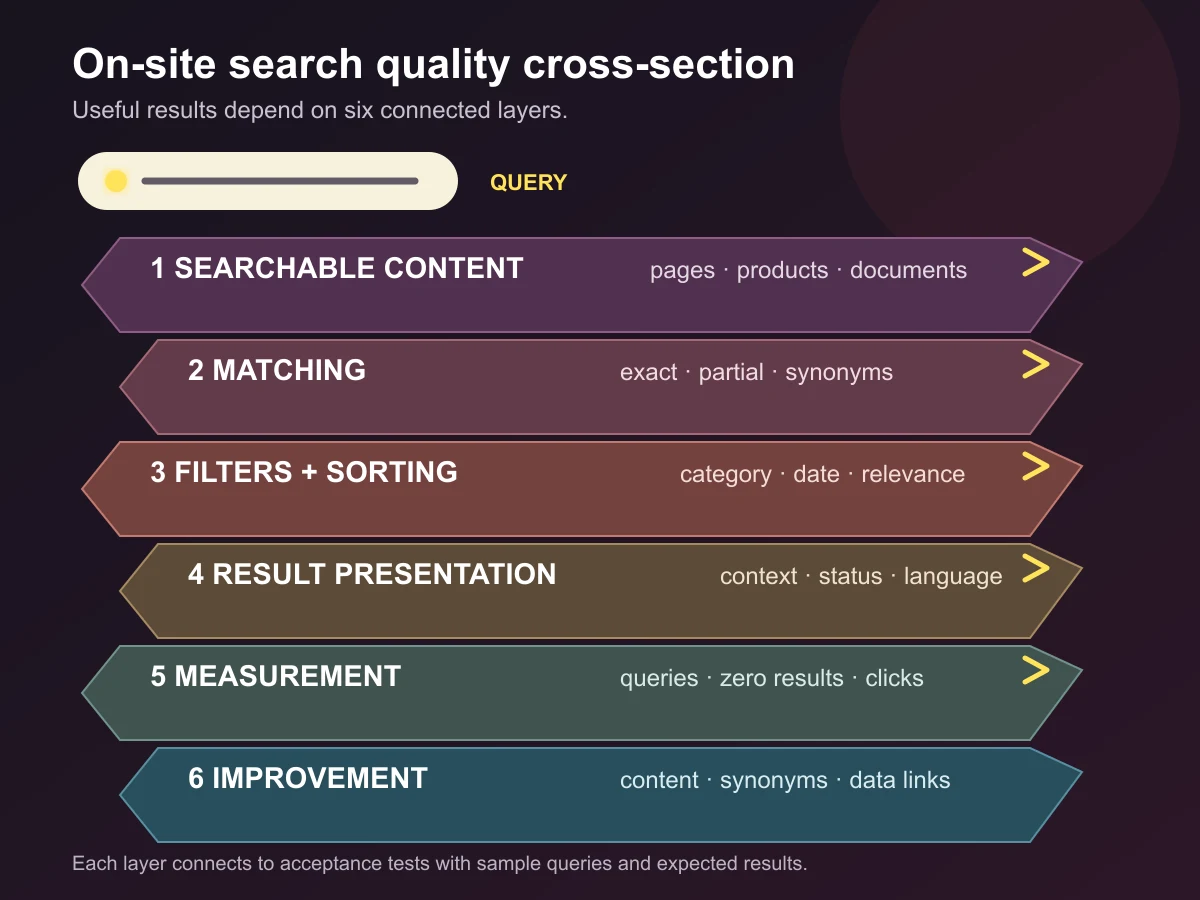
Before implementation, complete this table for each important user task:
| Area | Decision |
|---|---|
| User task | What is the visitor trying to find? |
| Searchable content | Which content types are included? |
| Searchable fields | Which titles, codes, summaries, attributes or document text participate? |
| Matching | How do exact, partial, synonym and spelling-tolerant matches work? |
| Filters | Which reliable data fields are used? |
| Sorting | Is relevance, date or another option available? |
| Result card | What context helps the visitor choose correctly? |
| No-result state | Which message, suggestion and route are shown? |
| Language and access | How are active language and permissions preserved? |
| Measurement | Which queries and result behaviours are tracked? |
| Acceptance test | What are the sample query, expected records and order? |
| Responsibility | Who owns content data, implementation and final acceptance? |
Conclusion
A useful search experience is not created by selecting a powerful search engine alone. Searchable content must be structured, fields must be populated consistently, filters must rely on dependable data relationships, result cards must provide enough context, and failed queries must enter an improvement process.
Begin by defining what the visitor is trying to find and by inventorying the content. Then document matching, filtering, sorting, result presentation, language and measurement decisions. Test those decisions with sample queries before launch. This changes the question from “Do we have a search box?” to “Can the visitor find the right content under the right conditions?”