


Aydınlatma metni yükleniyor…
Municipal and public-sector websites are no longer simply channels for publishing announcements and institutional information. They are essential service points where citizens discover services, check eligibility, submit documents, make payments, track requests and communicate securely with public bodies. Website design for municipalities must therefore bring visual identity, content management, accessibility, citizen-portal functionality, integrations and data security into one coordinated transformation programme.
A successful service does not expect citizens to understand the institution’s organisational chart. It begins with practical questions such as “How do I apply?”, “Which documents do I need?” and “What happens next?” Internally, the institution must also define content ownership, publishing approval, user permissions, record traceability and data exchange with existing systems. The objective is to combine the public website and the transactional portal without making either difficult to use or maintain.
Why is a public-sector website more than a corporate showcase?
The goal of a public website is not to keep visitors browsing for as long as possible. It is to help them reach the correct information or complete a task through the clearest available route. Council decisions, annual reports, procurement notices and department pages primarily provide information. Applications, payments, appointments, enquiries and service requests enable direct action. Although these functions may share an interface, they need structures suited to different user intentions.
The boundary between the website and citizen portal should be established early. Public information can remain available without authentication, while personal applications, account balances, documents and transaction histories belong in a protected area. This separation shapes navigation, permissions, performance, maintenance and security architecture.
Replicating the organisation chart online is rarely sufficient. A resident may not know which directorate manages a service. Alongside departmental navigation, the site should offer task-oriented routes such as Planning and Development, Social Support, Environment, Taxes and Payments, or Applications and Enquiries.
Planning should begin with the task citizens need to complete
Instead of moving every existing page into a new interface, the project should first identify its audiences and priority tasks. Residents, businesses, employees, journalists and visitors do not have identical needs. Research should establish which services each group uses most often, what information is required to complete them and where the current experience breaks down.
Call-centre records, service-desk questions, on-site searches and form abandonment points provide valuable evidence. When combined with interviews and task-based usability testing, they replace internal assumptions with observable needs. For each service, teams should document eligibility, required documents, steps, responsible department, expected completion time, notification channel and alternative application routes.
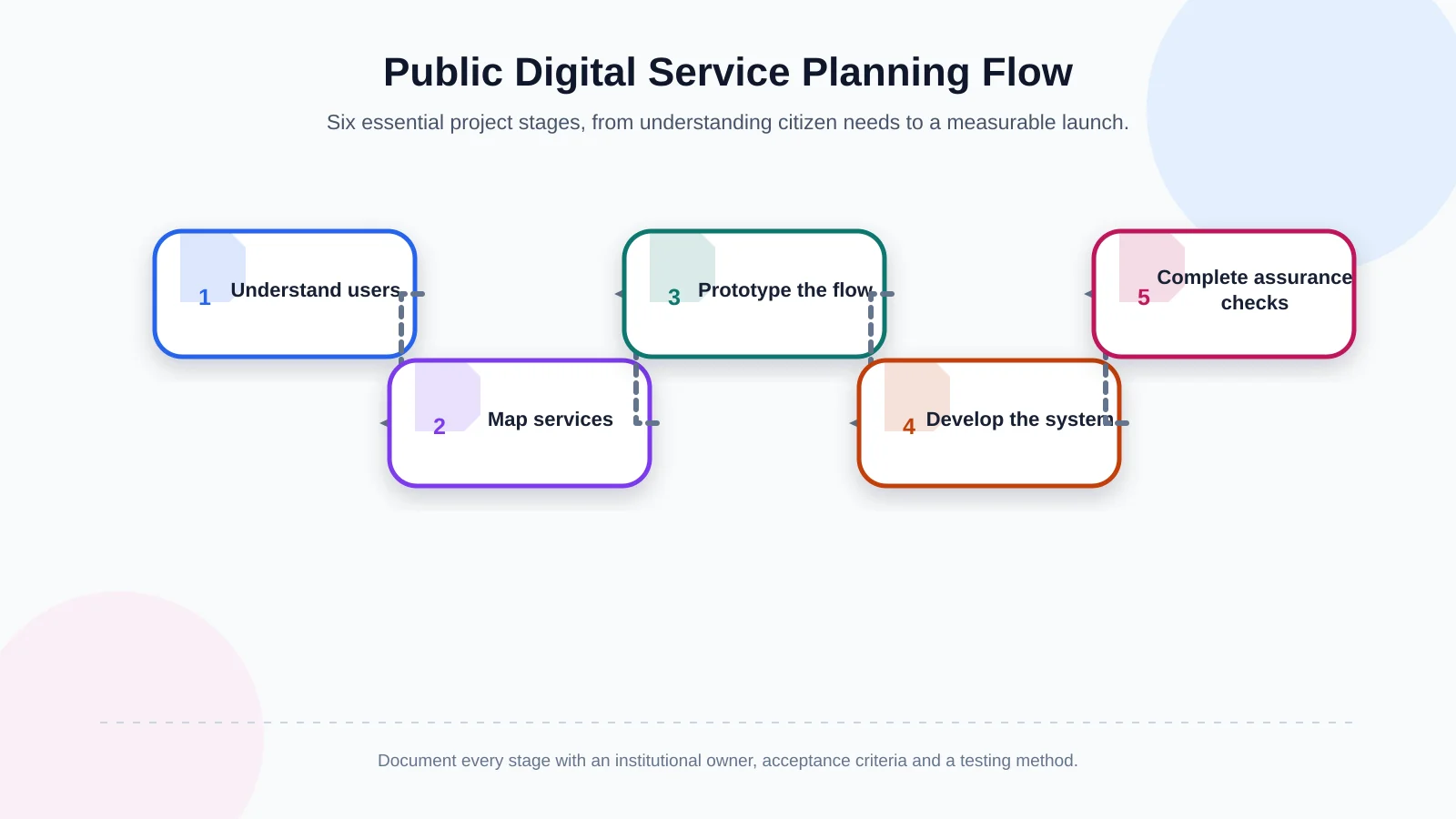
Recommended sequence from needs analysis to launch
Defining the scope early allows design, content and engineering teams to work from the same service scenarios. A practical sequence is:
- Identify citizen groups and priority tasks.
- Create a content inventory and service map.
- Prototype the information architecture and transaction flows.
- Develop accessible interfaces and portal functions.
- Complete integration, security and usability testing.
- Train content owners, launch and measure outcomes.
The scope should not be reduced to a list of screens. Form fields, validation rules, upload limits, roles, approvals, notifications, failure scenarios and integration responsibilities must become acceptance criteria. This turns “citizen portal” from an ambiguous request into a service that can be tested against agreed outcomes.
Information architecture and content language determine access to services
Good information architecture helps citizens find services without learning how the institution is organised. Primary navigation, search, service categories and contextual links should reinforce one another. Maintaining a single authoritative service record is generally more sustainable than repeating conflicting instructions across several department pages.
Each service page should begin with a concise summary and explain who can use the service, which documents are required, whether fees apply, which channels are available and what happens next. Calls to action such as “Apply online” should be visible, but citizens should not be sent into a complex form before they understand the conditions. Dates should be unambiguous, legal language should be accompanied by plain-English guidance where appropriate, and downloadable links should state the document type and file size.
A suitable content-management system should separate authoring, review and publishing permissions. Time-sensitive notices can have expiry dates, while service records can carry named owners and review schedules. Structured content also makes it easier to reuse accurate information across search results, portal screens and mobile experiences.
Accessibility is not a checklist for the end of the project
An accessible public website should allow people with different visual, hearing, mobility and cognitive needs to obtain information and complete transactions. The same practices benefit older users, people with temporary impairments and anyone attempting a service on a small screen or under difficult conditions. The W3C’s Web Content Accessibility Guidelines (WCAG) 2.2 provide testable success criteria organised around perceivable, operable, understandable and robust experiences.
Core practices include a meaningful heading hierarchy, complete keyboard access, visible focus indicators, sufficient colour contrast, purposeful alternative text and labels that clearly describe form controls. Colour should not be the only way to communicate status. Error messages should identify both the problem and how to correct it. Video content may require captions, transcripts or audio description depending on its purpose.
Automated scans are helpful but cannot prove accessibility on their own. A tool may detect missing attributes, yet it cannot reliably decide whether link text is meaningful or an application journey is understandable. Teams should conduct manual tests with keyboards, screen readers, magnification and different viewport sizes. Where possible, people with disabilities should participate in task testing. These checks should be repeated when templates, content patterns or portal releases change.
The citizen portal should make the transaction lifecycle visible
A citizen portal creates more value than a digital copy of a paper form. The user must be able to authenticate securely, select the correct service, complete the application, submit documents, monitor progress and provide further information when requested. Within the institution, the corresponding process may involve registration, verification, routing, review, approval, completion and archiving.
Long forms should be divided into logical stages with clear progress indicators. Information already held by the institution should not be requested again without a valid reason. Validation should appear at the relevant point rather than as a long list after submission. Users should be warned before a session expires, and draft saving should be offered where the service and security model allow it.
Citizen portal flow from application to outcome
Using a shared status model across citizen-facing and administrative systems reduces uncertainty:
- Discover the service and confirm application conditions.
- Verify identity and provide the required information.
- Attach documents, review details and submit.
- Route the application to the responsible team.
- Communicate status changes through secure channels.
- Present the outcome, close the case and retain the record appropriately.
Instead of vague labels such as “In progress”, the portal should show a status citizens can understand and the next expected action. Notifications should avoid exposing sensitive details and direct the recipient back to the secure portal. Citizen actions, staff decisions and automated system events should remain distinguishable in time-stamped audit records.
How should roles, permissions and integrations be designed?
Portal users should not share one permission level. Citizens, business representatives, call-centre staff, service specialists, approving officers, content editors and administrators require different information and actions. Each role should receive only the access needed for its responsibilities. Delegation or representation must have a defined scope, evidence and validity period.
Identity services, payment providers, document management, electronic records, geographic information systems, contact centres and internal applications may all supply portal data. The integration design should state which system is authoritative for each data object, when updates occur, how failed requests are retried and what users see when a dependency is unavailable. Similar principles apply when planning a website–CRM integration: field ownership, hand-offs, duplicate handling and feedback must be explicit rather than hidden inside technical implementation.
Security requirements should be part of design and acceptance criteria, not additions after development. The OWASP Application Security Verification Standard offers a structured basis for defining and testing controls covering architecture, authentication, sessions, access control and validation. The appropriate verification level should reflect the portal’s risks and the sensitivity of the information it processes.
| Role | Can view | Can do | Primary control |
|---|---|---|---|
| Citizen | Their own applications | Start and complete applications | Identity verification |
| Service specialist | Assigned records | Review and route cases | Departmental scope |
| Approving officer | Authorised decisions | Approve or return cases | Authority and transaction log |
| Content editor | Assigned content | Create drafts and updates | Publishing approval |
Data security and privacy should be built into service design
Every field on an application form should have a clear purpose. Data minimisation supports privacy while also making forms shorter and easier to complete. Citizens should be told why information is required, and retention and deletion processes should be aligned with the institution’s legal obligations.
Turkey’s Personal Data Protection Authority addresses risk assessment and proportionate technical and administrative controls in its Personal Data Security Guide. Encryption, access control, monitoring, backups and security testing therefore need to be supported by permission procedures, staff awareness and incident management.
Real citizen data should not be copied into test environments. Integration credentials require secure management, while permissions should be reviewed regularly. Audit logs must support accountability without creating unnecessary personal-data records. Backup restoration should be tested, and error messages must not disclose sensitive information or implementation details.
Mobile experience, performance and the hybrid-app decision
Because many citizens begin services on a phone, mobile usability cannot be treated as a desktop layout compressed onto a smaller screen. Touch targets, form controls, document uploads, camera use and weak network conditions should be tested on real devices. Essential information and transaction steps should not be delayed by heavy animation or oversized media.
A mobile application may be appropriate when a service depends on regular notifications, device capabilities, offline scenarios or frequent repeat use. A React Native hybrid approach can support shared product logic across iOS and Android, but an app does not replace an accessible, mobile-friendly website. Using common services for identity, permissions, transaction status and notifications helps the app and portal remain consistent.
Post-launch governance and success measurement
A public website is not finished on launch day. Regulations, service conditions, organisational structures and integrations change, so both content and software require continued ownership. Each content type should have a responsible team, review frequency and approval workflow. Expired notices, broken links, unavailable documents and unanswered portal requests need routine monitoring.
Visitor volume alone does not demonstrate success. More useful indicators include service-findability rates, application completion, errors by step, support demand, processing time and closure of accessibility findings. Analytics should respect privacy and cookie choices and collect only what is needed to support improvement decisions.
When usability reviews, content audits, security checks and performance testing follow a maintenance schedule, the service becomes less dependent on individual memory. Teams then know which template, approval process, accessibility criteria and security control to apply whenever a new service is introduced.
Plan a scope suited to your institution
Effective digital public services emerge when distinctive design, understandable content, accessible interaction, secure citizen accounts and dependable integrations work together. As an Istanbul-based digital agency, Kumsal Agency approaches municipal and public-sector projects as service systems rather than purely visual website renewals. Its Art Director-led design practice is combined with custom web software, content-management, mobile application and digital brand-consulting capabilities.
Plan the website and citizen-portal scope by evaluating your institution’s content structure, the tasks citizens need to complete, user roles and integration requirements together. Defining priority services and measurable outcomes at the beginning creates a realistic delivery roadmap and a clearer, more trustworthy digital experience for citizens.